What filing through FileTax actually looks like
Every screen, in the order you will meet it, with the real thing shown rather than described. If you want to know what you are handing over before you hand it over, this is the page.
About ten minutes for a straightforward year. The screenshots use a fictional filer, Test LLC, so nothing here belongs to a real customer. Looking for what Form 5472 is and why you owe it? Start with the guides.
Step 1
The eligibility check
Four steps, about a minute, before we take any details from you. They establish whether this is a filing we can prepare properly, and it is the only part of the process where the honest answer might be that you should see a CPA instead.
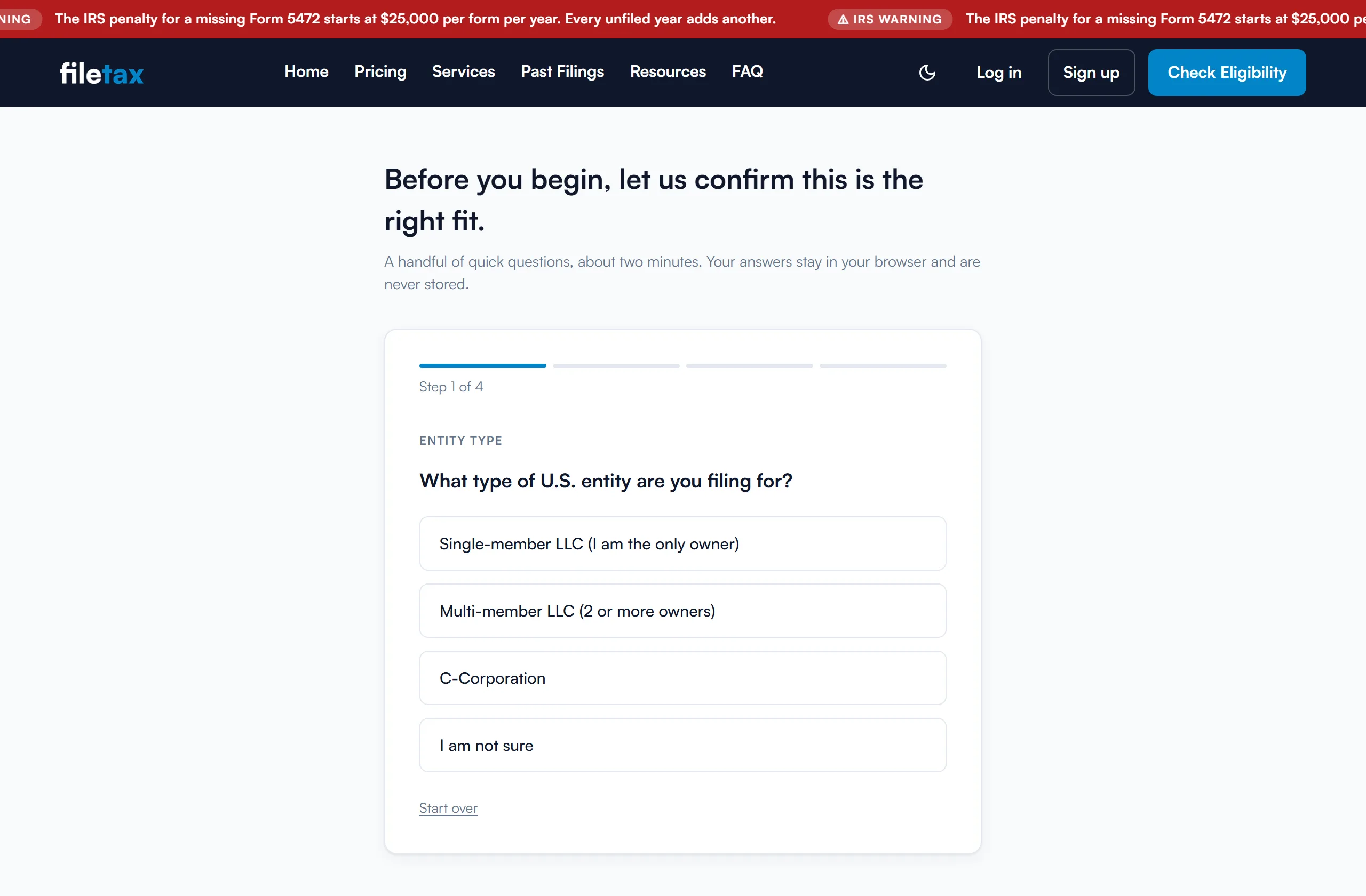
- Step 1, Entity Type
- One question: what type of U.S. entity you are filing for. Only a single-member LLC continues. A multi-member LLC, a C-Corporation, or an honest 'I am not sure' each stop here with an explanation of why a professional should look at it first. If you are unsure whether your situation is even a Form 5472 one, it is worth reading which of Form 5472 and Form 5471 you actually file before you begin.
- Step 2, LLC Setup
- Three yes-or-no questions, one after another. Has the IRS issued an EIN? Is the owner a non-U.S. individual, meaning no U.S. citizenship, no Green Card, and no Substantial Presence? And is the LLC still taxed the way it was when it was formed, with no election filed to change that? No EIN means there is nothing to file against yet, and applying is free at IRS.gov. A Form 8832 or Form 2553 already on file means the LLC is no longer a disregarded entity, which changes the return entirely.
- Step 3, Your Dealings
- Five questions about who else the LLC deals with: cost sharing arrangements, imported goods from a related party, third-party loans, treaty-affected interest or royalties, and related-company lending around a payout or acquisition. An ordinary filer answers No to all five. A Yes puts your filing in Part VII or Part VIII of Form 5472, which is work for a person rather than a form. Each question carries a plain-language note on screen saying what counts, and money moving between you and your own LLC never does, which is the distinction that trips most owners up.
- Step 4, Filing Years
- How many tax years you need, as a count rather than the specific years, which is enough to show you a price. You pick the actual years in the portal, where we check them against the date your LLC was formed and work out which ones are late. We support tax years back to 2019. If you would rather arrive with everything to hand, here is what to gather before you start.
Your answers here are never stored and never carried into the portal, so there is nothing to leak from a screen you may have only been browsing. Your first intake asks for your LLC details from scratch; after that we pre-fill from your last filing.
Step 2
Creating your account
Free, and no payment is taken at this point. You choose an email address and a password, confirm the email, and sign in.
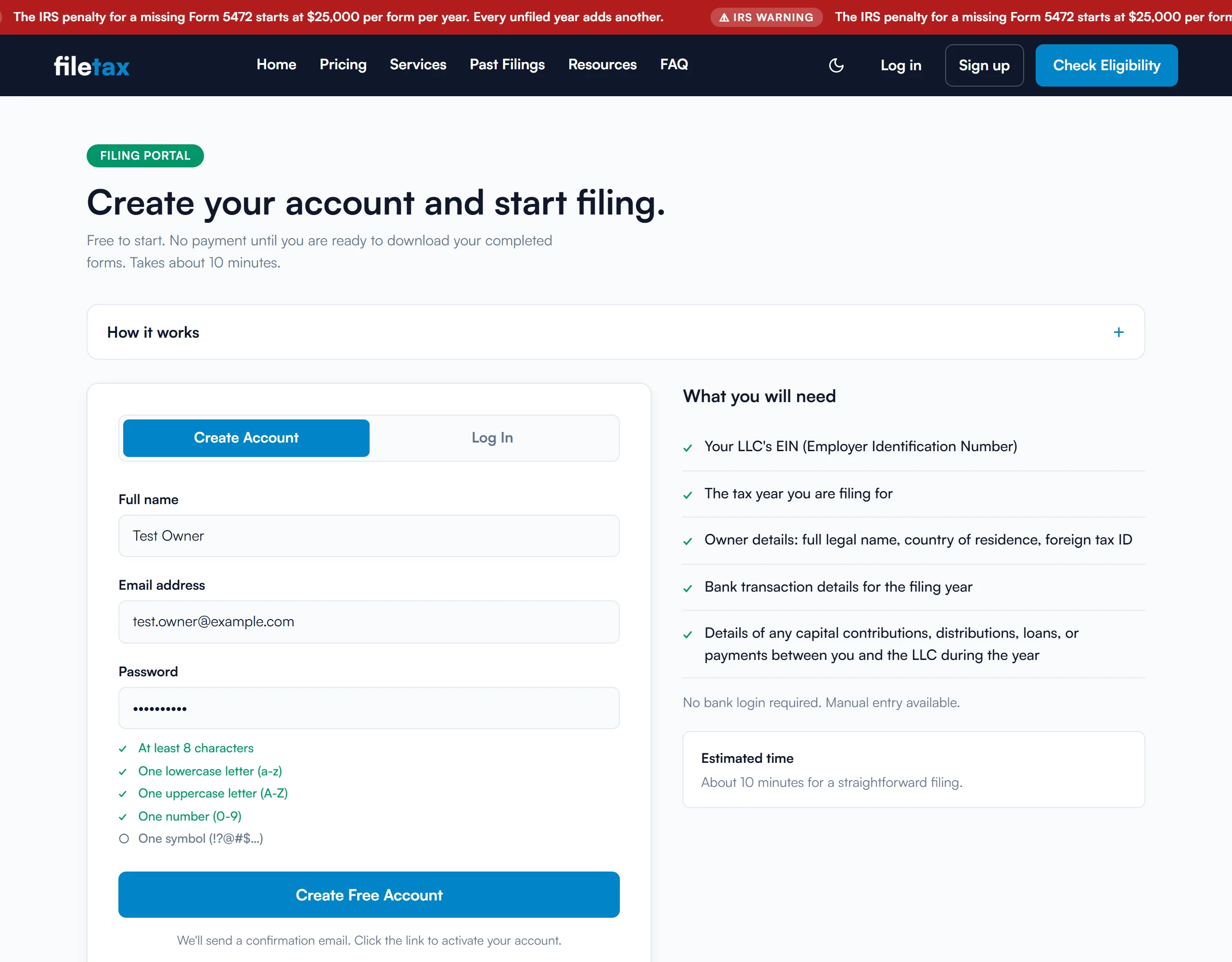
- The password requirements are shown as you type
- At least 8 characters, with a lowercase letter, an uppercase letter, a number and a symbol, ticked off under the field in real time rather than after you submit. The password is also checked against the HaveIBeenPwned breach database, using k-anonymity, so only a partial hash prefix leaves your browser and never the password itself. A password that has appeared in a public breach is rejected.
- What to have ready
- Your EIN, the tax year, your state of formation and incorporation date, your legal name, country of residence and foreign tax ID, and the year's transactions between you and the LLC. No bank login, and we never ask you to upload statements.
Step 3
Your dashboard
Every filing you start appears here and stays here once it is finished, so you can come back and download the package again later. Filings are grouped by company, and the row of counts at the top tells you what still needs you.
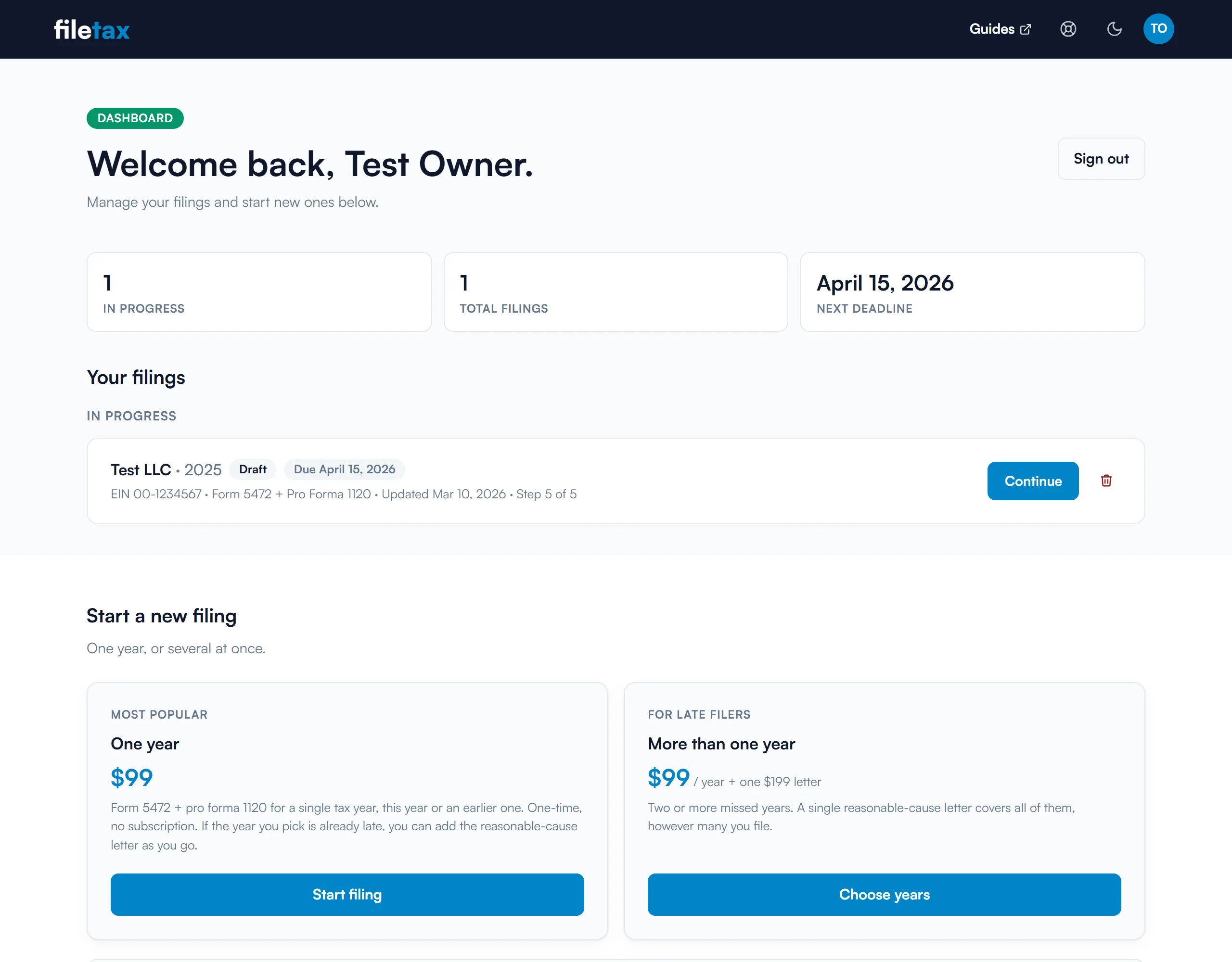
- One badge per filing, saying where it is
- Draft, In progress, Ready to download, Downloaded, and Payment failed if a card is declined. If you bought fax delivery, the badge tracks the fax through to Faxed to the IRS instead.
- Your deadline is worked out for you
- Each filing shows its own IRS position for that tax year, from the original due date through the extended one to 'Past due, file ASAP'. The summary row shows your nearest deadline across every unfinished filing, and a filing you have faxed stops showing one at all.
- Your companies are remembered, and nothing is lost if you stop
- Each company you have filed for keeps its own group, and starting the next year from there carries your LLC and owner details forward for you to review. The intake saves as you go, so you can close the tab partway through and pick it up days later on a different machine, at the section you left. Drafts you have not paid for can be deleted, including a whole catch-up at once.
Step 4
The intake, section by section
This is the part that takes real time, about ten minutes for a straightforward year. It is six sections, one of which only appears if your filing is late. They open one at a time, in order, and a completed section stays open to be reread and corrected.
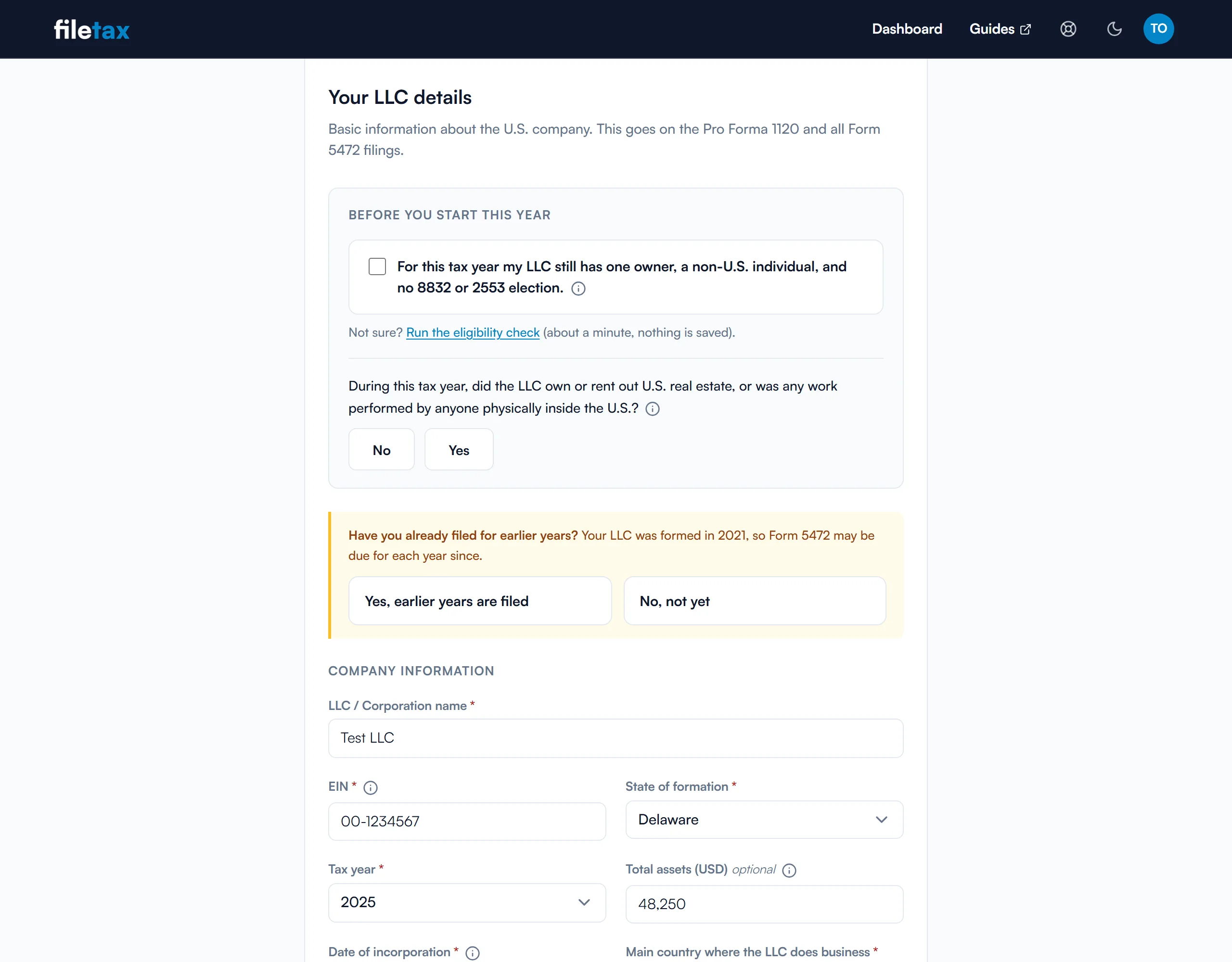
- LLC Details
- Legal name, EIN, tax year, state of formation, date of incorporation, your business activity, and total assets at year end. The business activity picks the NAICS code for you rather than making you look one up. A year you have already filed and paid for under that EIN is shown as already filed and cannot be picked twice.
- Filing Status, only when the year is late
- Appears only if the due date for that year has passed, and asks why the filing is late in a few structured questions rather than a blank box.
- Owner Details
- Your legal name, address, country of residence and citizenship, and your foreign tax ID. The tax ID field knows your country's format and warns you if it does not match.
- Related Parties
- Most single-member LLCs have exactly one, you, and this section stays empty. Add a party only if the LLC transacted with a foreign parent or another entity you control. Each is its own Form 5472, every year.
- Transactions
- The money and non-money movements between you and the LLC during the year: capital contributions, distributions, loans, services, reimbursements. You enter them manually, each against the related party it belongs to, and each one is saved as you add it. A running total sits under the list. These populate Part IV, Part V and Part VI of Form 5472, and if you are unsure what belongs here, start with which contributions, loans and distributions are reportable and then check your entries against the mistakes foreign LLC owners make most often.
- Review, where you see your own forms before you pay
- A plain-language summary of everything you entered, and under it your filled Form 5472 and pro forma 1120, built from your own answers on the IRS form revision for your year. Check that your name, your EIN and your figures have landed in the right boxes, then decide whether to buy anything. This is the last point at which a typo is free to fix. The preview carries a DRAFT watermark, because it is not a filing until you have paid and signed it. If you want to read the boxes as you check them, we explain Form 5472 line by line and which fields of the pro forma 1120 you actually complete.
Each section validates before it lets you continue. If something is missing or does not look right, you are told on that screen rather than after payment.
Step 5
Paying, signing and downloading
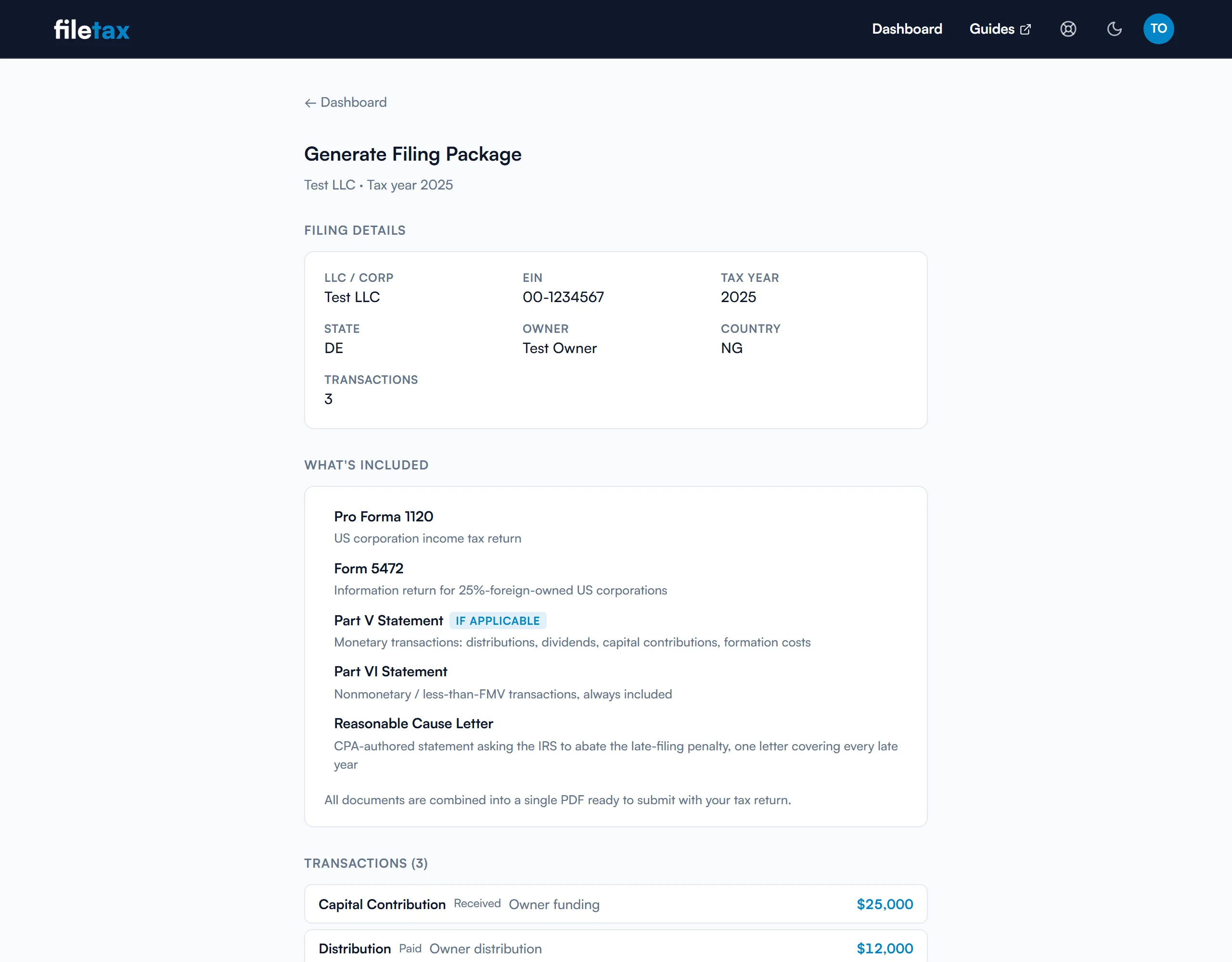
Leaving Review takes you to a page headed Review and Payment. Once payment clears, the same page becomes Generate Filing Package. Your package is built from the details you entered, on the IRS form revision in force for that tax year, not on the current year's form for every year.
- What you are charged, itemised
- $99 per tax year, and $25 for each additional related party per year. Anything else you chose is a separate line on the same screen, and you see that total before you are asked to pay. Prices exclude tax: any tax due, and the currency you are billed in, are calculated at checkout from your billing country.
- The card details are never ours to hold
- Paying hands you to our payment provider's own checkout page and back. There is no card field anywhere on FileTax for a card number to be typed into or stored in.
- What is in the package
- Always the pro forma Form 1120 and Form 5472, one Form 5472 per related party, and a Part VI statement, behind filing instructions for your year carrying the address and fax number. A Part V statement is added if you had monetary transactions, and a Form 7004 if one applies. The screen lists exactly what yours contains.
- You sign at the end, not before
- Draw your signature, or leave the pad blank and it falls back to your typed name on the signature line. Signing is the last thing you do before your package is built, so what you sign is the filing you are about to receive, and on a catch-up one signature covers every year. We keep the typed name, never an image of your hand, so the pad is blank each time you return and a PDF you have already downloaded stays as it was.
Step 6
Sending it to the IRS
The package is complete and signed when you download it. What it still needs is to reach the IRS, and that step is yours unless you add fax delivery.

- By mail or by fax, yourself
- Form 5472 with a pro forma 1120 goes to the IRS by mail or by fax. The filing instructions at the front of your package give the address and fax number for your filing, so you are not hunting for them.
- Or we fax it for you, for $9
- One charge for the whole job, however many years it covers, added while you file or from the filing afterwards. It does not fire on its own: you press Send to the IRS by fax, so the moment your pages leave is a moment you chose. If it fails, the panel says why and lets you try again.
- You get a receipt, and the filing then locks
- The panel tracks the transmission and shows pages transmitted against pages the receiving end confirmed. The two matching is the thing worth looking for: it means every page arrived, not just that the call connected. Once confirmed, you can download a dated confirmation and the exact pages the IRS received, which is what answers any later question about when you filed. That filing then becomes read-only, because changing it here would no longer change what they hold.
What paying does, and does not, lock
The most common worry at the pay screen is whether a mistake spotted afterwards is an expensive one. It is not.
- You can correct it as many times as you need
- No cap on corrections and no charge for them. Fix a figure, add a transaction, change an address, and regenerate as often as you like. An error you spot three days later is not a filing you have to buy again.
- Six fields lock, and they are the ones that identify the filing
- The EIN, the LLC name, the tax year, your legal name, your foreign tax ID and the incorporation date. Changing any of those is not a correction, it is a different filing. Everything else stays open.
- Your package stays downloadable, and a late related party costs only itself
- Sign in and take the package again whenever you need it, with nothing expiring and no second charge. If another party turns out to belong on the return, add them for $25 and the updated forms unlock when that clears. The filing itself is never charged for twice.
The one exception is a filing we have already faxed to the IRS, which becomes read-only. See Sending it to the IRS.
If you are catching up several years
The flow above describes one tax year. Several missed years work the same way, with two differences worth knowing before you start.

- ✓You enter the shared details once. What changes year to year is the transactions and the total assets.
- ✓Each year gets its own correct form revision. A 2021 filing is rendered on the 2021 Form 1120, not on this year's.
What this flow does not do
Worth reading before you start rather than after.
- We do not prepare your personal return
- No Form 1040-NR. The intake asks about U.S. activity per tax year, so you are told rather than left to find out.
- We do not respond to IRS notices
- If the IRS has already written to you, that is a different position. Take it to a CPA.
- We do not decide what your LLC did
- The transactions you enter are the ones we report, so uncertain figures have to be resolved first.
- We do not offer judgement on a complicated position
- If your situation turns on facts a form cannot capture, you want a person, and the eligibility check will refer you out rather than take your money.
Weighing this against an accountant? See how we compare to a CPA.
Ready to see where you stand?
Start with the eligibility check. It takes about a minute, stores nothing, and tells you honestly whether we can help.